Encoder Do-Over
So it turns out that all the effort to get the servo and sensor off to another processor, the Trinket, was not needed.
I had forgotten that the encoder signals can be processed using pin interrupts, which is the recommended way to do things. When I was first implementing the encoders, on a different bot, availing of the pin interrupts was not possible so was forced to used a timer interrupt to sample the encoders instead.
For the Zumo build the pin interrupts are available and I’ve reimplemented the encoders accordingly. The result is that the pin interrupts work perfectly and do not cause problems for the rest of the system, unlike the high frequency timer interrupt which was eating up all the CPU cycles. So problem solved with much less effort than adding the second processor.
Still, having the option to off-load the servo and sensor may come in handy if there is a need to free up pins on the Arduino. It was also great to have an excuse to play with the Trinket.
Feeling much better about using the Arduino for the rest of this project.
You can view all the code on GitHub.
Untethered At Last
Purchased an inexpensive Bluetooth transceiver module from Amazon. Just got it today.

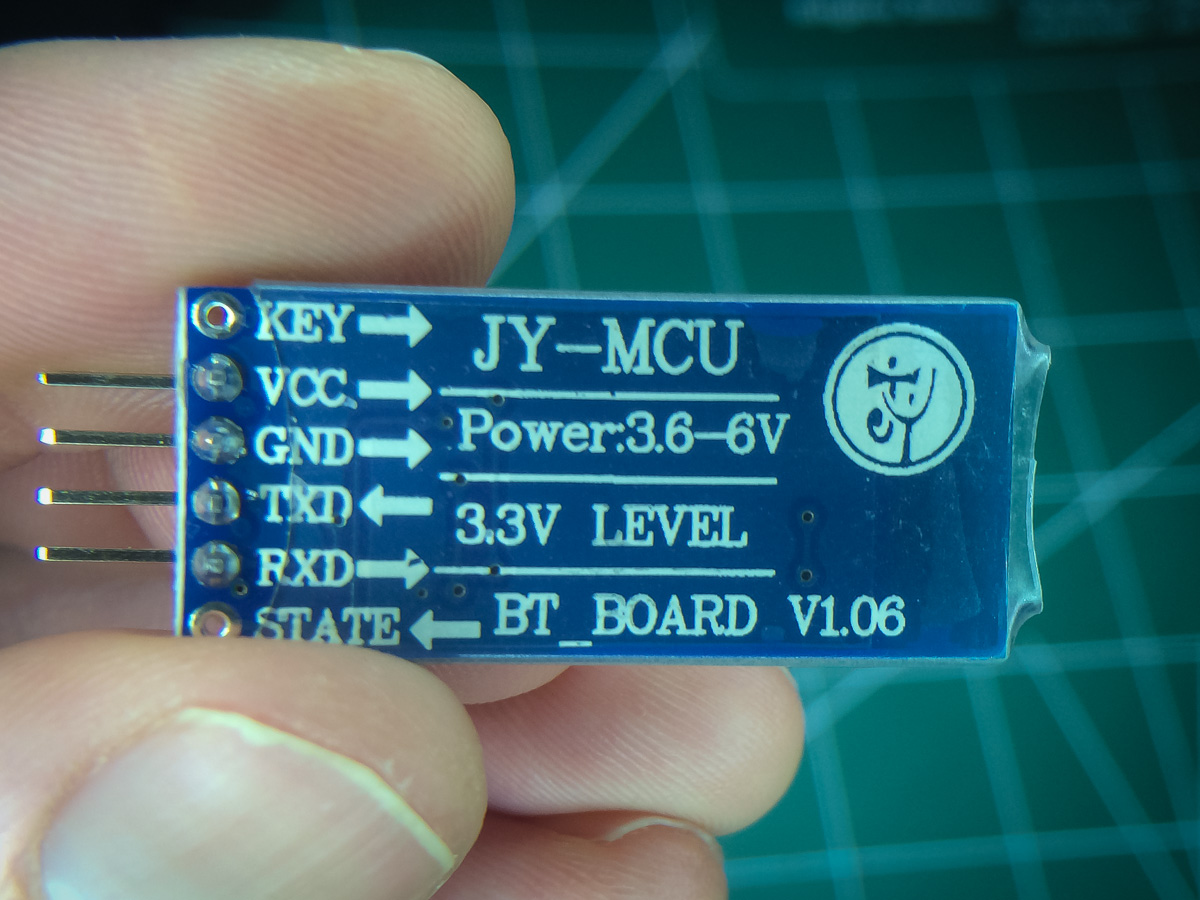
Doesn’t get any simpler than this device. Just plug in 5V, GND, Tx to pin 0 and Rx to pin 1, fire it up and pair it to your computer (type in 1234 if asked for a code).
For now I just stuck it on the rear of the bot.

Eventually I’ll figure a better location for it.
And the timing is perfect. I’m in the process tuning the PID controller. Before this would mean having to tether the bot to my laptop and follow it around to collect data. Now the laptop stays on the desk and collects data untethered. It’s surprising how nice this is. Definitely my favorite piece of kit so far.
Also thinking about creating an app that acts as a remote UI, over the serial link, so that realtime data can be collected and displayed, and even provide simple inputs/settings to the bot. Maybe such an app exists already. I’d much rather that than mess around with an LCD display.
 solderspot
Is it also possible to use your code without the encoder? So it drives through a room depending only on the sonar?
LikeLike
Yes. Set the variable PIDenabled to false and USE_PATHS to 0.
LikeLike
I used your code and it works! It’s alive;-) Only one thing i am trying to figure out is that it moves slightly to left. I learned a lot of how it works. Up to the next step. Thank you so much for sharing!
LikeLike
That is great to hear. Glad it was useful to you. Have fun getting it to go straight.
LikeLike
So strange when i upload a standard zumomotor example sketch it moves straight but now it moves slightly to the left.
I adjust int LMotorGain = 110 so it should move to the right a bit more. But it does not
Can you give me a hint?
LikeLike
Are you using encoders and/or the PID controller?
Setting LMotorGain should definitely have an effect. Set MOTOR_INFO to 1 so you can verify what values are getting sent to the motors.
LikeLike
I dont have encoders so i dont have a pid controller, is that correct?
Is the servo or the sonar catching some power of the left motor or interupting it?
LikeLike
I would suggest removing all the encoder and PID code as you do not need it. Also get rid of the path code.
I wonder if the servo/sensor are affecting the motors. I’ve not done any tests myself but you can try simply unplugging them and see if that has an affect.
I’ll try testing tonight as well. I’m curious about what is happening. I have quite serious drift to the left.
LikeLike
With no servo or sensor and the simplest sketch I still get the same drift left. In my case it seems to be either a motor imbalance or some kind of wheel alignment issue. I’m guessing the second as I am getting drift even when the encoder ticks are the same for both wheels.
LikeLike
My problem was wheel alignment. The Zumo bot has a lot of slack in the idler wheels.
LikeLike
Enjoyed your coding. My Zumo works without the PID & Encoder.
Do you think your code with some changes to pins setup will work with Pololu 3Pi?
LikeLike
I don’t see why you would not be able to get it running on the 3Pi but I don’t have any experience with that platform. The devil is always in the details.
LikeLike
My wish is to see your tutorial on controlling Arduino with Xbee. There isnt much comprehensive example that shows Xbee with Arduino or with Zumo & 3Pi?
LikeLike
At some point I will experiment with XBees but it might be a while.
LikeLike
Hi solderspot
Thank you for all the help you’ve given me.
Here are some apps for you. You’ll find them on Google. Look in ARDUDROID and BLUNO and the best is ATOMWARE/Kickstarter. It’s brand new.
Ben
LikeLike